Hiển thị các bài đăng có nhãn restore iphone. Hiển thị tất cả bài đăng

Thứ Tư, 28 tháng 9, 2016

Fix iTunes Error 3014 When Updating & Restoring iPhone

iPhones are indeed very advanced smartphones, yet iOS isn’t really all error-free. This software platform often runs into trouble, the errors are typically user serviceable but unless the correct steps are taken, it might cause a trouble for an iPhone user. iPhone error 3014, also known as iTunes error 3014 is quite common and a lot of people had faced this lately – because a lot of people are trying to update to the iOS 10 that was rolled out just 2 days ago. iTunes encounter error 3014 mostly due to communication error between the computer and Apple servers, but there are other known problems as well.
Fix iTunes error 3014

How to fix iTunes error 3014 When you Restore / Update iPhone

Below are the top 6 tested methods to fix iTunes error 3014 and complete the restore process:
  1. Confirm Having the Latest Version of iTunes: Apparently, in order to download the latest version of iOS and install in your iPhone, iPad or iPod Touch, the latest version of iTunes should be installed on a computer. The older versions may not be able to set the connection parameters right, also there might be a conflict between different versions of iOS and iTunes.
  2. Check your Computer’s Date & Time: Having a wrong date and time on your computer would create trouble with the internet connectivity. In order to have flawless internet connectivity, having the accurate time zone and date set in a computer is necessary. If you use a Windows computer, click on the bottom right corner on the task bar and change the date & time into proper values. Try using iTunes after you are done.
  3. Operating System on your Computer: Although this is one of the minor issues that might cause an iTunes error, yet having the latest operating system installed on your computer is the safest bet. If you use Windows platform then check for Windows update using Control Panel. For Macintosh users, you should have update notification if an update is available – update accordingly.
  1. Check Internet Connectivity: If everything mentioned above is okay on your computer, the issue could be with your internet connectivity. Maybe iTunes on your computer can’t reach the Apple servers and giving you error 3014, because that’s common. Check whether any ports are blocked on your computer’s network settings, or even your router. If everything seems alright then it could be an ISP issue as well.
  2. Security Barrier: Almost every Windows user keeps a security software in their computer and they often block iTunes. The firewall would block iTunes server connections if an exception is not added in your firewall program. However, the antivirus software may even identify iTunes as a malware. Check with your security program for such issues. 
  3.  Check HOSTS Files: This is slightly advanced level task than the previous ones we have mentioned here. Open this location C:WindowsSystem32drivers\etc in your Windows computer, and locate the HOSTS file. This file should open with Notepad in your computer. If your iPhone is jailbroken and you have SHSH blob files located at Cydia or any other jailbreaking servers then you would have to add an IP address to the HOSTS file. Add this line at the end of the HOSTS file 74.208.10.249 gs.apple.com.


khắc phục iTunes Error 3014 khi update & restore

1. kiểm tra cập nhật itunes mới nhất ở đây

2. cài đặt ngày tháng chính xác trong máy tính

3. gỡ bỏ itunes cũ cài lại itunes mới nhất

4. kiểm tra kết nối mạng (itunes cần mạng để xác minh)

5. không bật tường lửa với phần mềm

6. file host trong hệ thống phải có dòng 74.208.10.249 gs.apple.com nếu thiếu dòng này các bạn có thể thêm vào.

Read More

Thứ Ba, 27 tháng 9, 2016

jailbreak ios 9.2 - 9.3.3

Jailbreak guide: for ios 9.2 -9.3.3
ios 9.3.5 not support

Preparation:
1. jailbreak IPA file DOWNLOAD
 2. Cydia impactor FOR WIN  DOWNLOAD  
                       MAC DOWNLOAD
(Special Note: This tool, developed by Saurik, is used to sign the ipa file so that Pangu jailbreak tool can be executed on iOS devices. Cydia impactors does not collect your apple id and password. All the information is only used for applying a personal free certificate from Apple.)
3. A computer (Cydia impactor runs on all major OSes, including Windows, OS X, and Linux)
4. A valid Apple ID. (In case that you do not want to use your current Apple ID to apply the personal certificate for any reason, we suggest you apply a new Apple ID and use it)
Option “Use embedded certificate effective until April 2017"


  • If you chose the option "Use embedded certificate effective until April 2017", Pangu 9 will install an app that is signed by a revoked certificate. Before April 2017, you will not need reinstall Pangu jailbreak app.
  • If you want to sign the app with your own certificate, do not select this option.
  • Limitations:
    1. An Apple ID can only apply for a certificate for a limited number of devices.
    2. The certificate will expire in 7 days. If your certificate gets expired, you need to follow the guide to install the jailbreak IPA again.
    To Apple Developers:
    If you have enrolled the Apple developer membership, signing the IPA file with your own developer certification is a better choice (i.e., Pangu jailbreak app will get expired in 1 year, rather than 7 days).
    Jailbreak guide:
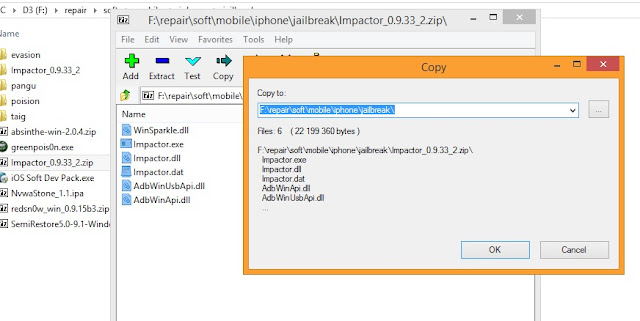
    1. Unzip the Cydia impactor file and run it.


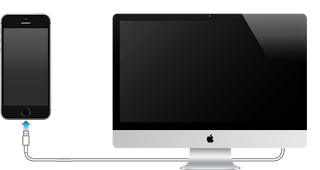
    2. Connect your iOS device to your computer and trust the computer on your iOS device.


    3. Drag NvwaStone_1.0.ipa into Cydia impactor app.

    4. Input you email address( it’s your apple id)

    5. Input your apple ID password.

    6. Click OK button to continue.

    7. Cydia impactor will automatically prepare everything based on your inputs and sign the IPA file. If everything is OK, the IPA file should be installed in your iOS device correctly. If you get error notifications, you probably input incorrect Apple ID or password.
    8. On your device, Tap Settings > General > Device Management. You then see a profile for the developer under your “apple ID” heading. Tap the profile to establish trust for this developer. (An Internet connection is required to verify the app developer's certificate when establishing trust.)
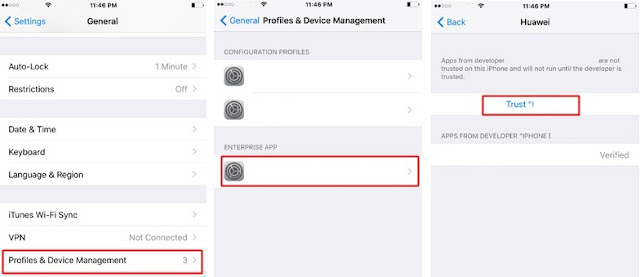

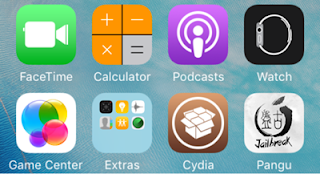
    9. On your device, find Pangu App and run it.

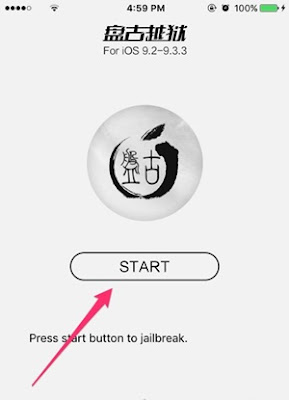
    10. Click the "start" button to jailbreak your device.
     
    Read More

    itools latest version 2016

    ITOOLS 2016
    CHINA VER 3.3.8.7 DOWNLOAD
    ENG VER 3.3.7.7 DOWNLOAD
    FOR MAC DOWNLOAD


    iTools Ringtone Maker

    This is specifically for Apple devices ringtone editing software. By simply the first few steps you can create a unique ringtone own. Software will make a good sound directly into the Apple device. Download it and start your own DIY ringtone now !


    iTools AirPlay

    Allows you to enjoy the fun of the game on the big screen , Computer connected to the HiFi sound, the music in the iphone can also be ,Share photos with family and friends, nest on the sofa together.


     AirPlay Pro for Mac

    Allows you to enjoy the fun of the game on the big screen , Computer connected to the HiFi sound, the music in the iphone can also be ,Share photos with family and friends, nest on the sofa together.


    iTools Data Transfer

    Help you to migrate your old phone's data to a new phone, including pictures, videos, music, contacts, messages, etc.


    iTools(EN)

    Apple iOS device management tools, the classic interface, simple operation Perfect support for iPhone, iPad, iTouch. and clear customized caches and rubbish, and make data safer!Hunting Rarely used apps, release your device space !


    iTools Pro for Mac

    Apple Cocoa technology, the new interface design, more in line with the Mac operating habits. Ringtones follow the mood,My ringtone I make decision. Finder File System,Zero learning costs, Browser to quickly locate


    Read More

    itools latest version 2016

    ITOOLS 2016
    CHINA VER 3.3.8.7 DOWNLOAD
    ENG VER 3.3.7.7 DOWNLOAD
    FOR MAC DOWNLOAD


    iTools Ringtone Maker

    This is specifically for Apple devices ringtone editing software. By simply the first few steps you can create a unique ringtone own. Software will make a good sound directly into the Apple device. Download it and start your own DIY ringtone now !


    iTools AirPlay

    Allows you to enjoy the fun of the game on the big screen , Computer connected to the HiFi sound, the music in the iphone can also be ,Share photos with family and friends, nest on the sofa together.


     AirPlay Pro for Mac

    Allows you to enjoy the fun of the game on the big screen , Computer connected to the HiFi sound, the music in the iphone can also be ,Share photos with family and friends, nest on the sofa together.


    iTools Data Transfer

    Help you to migrate your old phone's data to a new phone, including pictures, videos, music, contacts, messages, etc.


    iTools(EN)

    Apple iOS device management tools, the classic interface, simple operation Perfect support for iPhone, iPad, iTouch. and clear customized caches and rubbish, and make data safer!Hunting Rarely used apps, release your device space !


    iTools Pro for Mac

    Apple Cocoa technology, the new interface design, more in line with the Mac operating habits. Ringtones follow the mood,My ringtone I make decision. Finder File System,Zero learning costs, Browser to quickly locate

    Read More